Why Can't All Parts Simulate?
Cirkit Designer's parts library includes thousands of components for designing circuits. However, not all of them are simulation-ready. A part can still be used in your circuit design even if it isn't simulation-ready.
This page explains why, and what you can do about it.
Simulation Support is Per-Part
Each component in the parts library is a separate piece of software. For a part to work in the simulator, it needs dedicated simulation code that defines how it behaves: how it responds to voltage on its pins, what signals it outputs, and how it interacts with other parts in the circuit.
Writing and validating this code takes time, so simulation support is added to parts individually. Some parts have it, and some don't. A part that isn't simulation-ready is still fully functional for circuit design, wiring, and documentation.
What Happens When a Part Doesn't Simulate
If your circuit includes parts that don't support simulation, they won't block you from running the simulator. Here's what to expect:
- Unsupported parts stay visible on the canvas but are dimmed to indicate they won't participate in the simulation.
- A warning panel appears listing which parts are affected.
- The rest of your circuit still simulates normally. Supported parts interact with each other as expected.
The unsupported parts are essentially invisible to the simulator. They don't generate or respond to signals during the simulation run.
How to Find Simulation-Ready Parts
If a part in your circuit doesn't support simulation, there may be a simulation-ready version available in the parts library.
Using the Simulation Filter
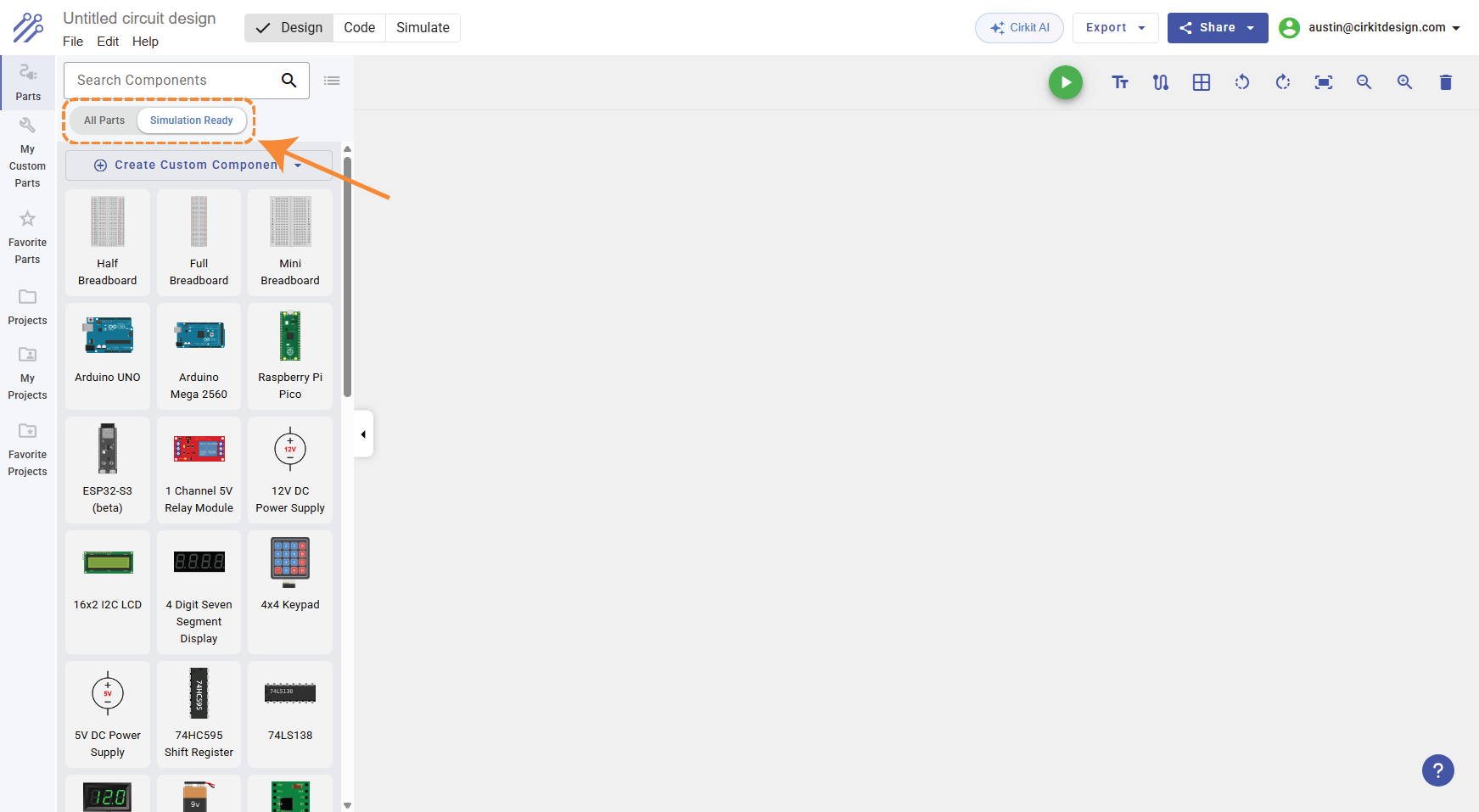
Open the Components Panel and click the Simulation Ready filter at the top. Only parts that work with the simulator will be shown.
Using Find Alternative
When the simulator detects unsupported parts, the warning panel includes a Find Alternative button next to each affected part. Clicking it opens the Components Panel with the Simulation Ready filter enabled and searches for parts with a similar name.
This won't always find an exact match, but it's a good starting point.
How Simulation Support Gets Added
Simulation-ready parts are created in a few ways:
- The Cirkit team builds and maintains simulation support for popular components like Arduino boards, LEDs, resistors, sensors, and displays.
- Community contributors can build simulation support for parts using the Component Builder. This is an advanced feature that involves writing TypeScript code to define how a part behaves in simulation.
- AI-assisted creation: the Component Builder includes an AI assistant that can generate simulation code, making it faster to add support for new parts.
The library of simulation-ready parts grows over time as new components are added by the team and the community.
Summary
| Question | Answer |
|---|---|
| Why doesn't my part simulate? | It doesn't have simulation code written for it yet. |
| Does it break my circuit? | No. Unsupported parts stay visible but don't affect the simulation. |
| Can I still use the part? | Yes. It works normally for circuit design, wiring, and documentation. |
| Is there an alternative? | Maybe. Use the Simulation Ready filter or Find Alternative to check. |
| Will more parts be supported? | Yes. New simulation-ready parts are added regularly. |
| Can I add simulation support myself? | Yes, using the Component Builder (advanced). |